Advanced configuration & administration
Power button
You can configure Motioncube Player to handle the POWER button on the Rii Mini i7 remote and allow shutting down the device with the remote. When POWER is pressed, Player can show a confirmation dialog and optionally require the user PIN to prevent accidental shutdowns.
General options and tools
You can customize the reaction to the POWER button.
Go to Settings → Advanced (enable Service mode) → Power Button advanced settings.
Available functions:
- Choose system action: Shutdown (recommended) or Sleep
- Enable or disable PIN confirmation requirement
Read more in Power management section.
Enabling Power button handling
To use the POWER button on the Rii remote, enable its activity in PlayerLauncher.
Read here how to run PlayerLauncher.
In PlayerLauncher settings: Remote → Active ON.
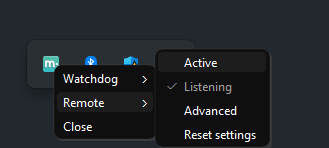
Advanced monitoring options
• Active — Enable or disable handling of the remote inside Player.
• Listening — Enable or disable event listening at the PlayerLauncher level.
• Advanced — Configure another remote model on your own if needed.
• Reset settings — Restore defaults.
Usage example
Enable the remote in the system and try it
After pressing POWER, a confirmation window appears, followed by a PIN prompt if confirmation is required.
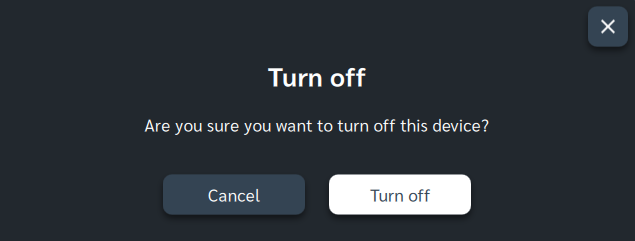
The short video below shows the full flow and typical situations.
In the first pass, the video shows the flow with user PIN confirmation. In the second pass, it shows how to disable the PIN prompt to shut down faster. In both cases, there is a 10‑second window to cancel the process.
(Watch in full screen at Full HD resolution for best clarity)
Remote control power button
Watch directly on YouTubeManage Consents
Control which external services can process your data.
Essential Required
These features are essential for the proper functioning of the website and cannot be disabled.
Anonymous Analytics Required
Required for collecting aggregated statistics that help us understand how users interact with our site. Data is fully anonymous, contains no personal information, and we do not use cookies.
Extended Analytics
Allows analyzing traffic sources (where you came from), marketing campaign parameters (UTM), and navigation paths across subdomains. We use a cookie (7 days) to preserve this data.
External Media
Allows loading content from external services like YouTube or Vimeo.
